

Ever wondered how to create an interactive voice response system that answers your customer calls automatically, routes them to the right department, or collects information without a live agent? That’s exactly what IVR does, and setting it up isn’t as hard as it sounds. Let’s break it down step by step.
What is Interactive Voice Response (IVR)?
Before you learn how to create an interactive voice response, let’s understand what it actually means.
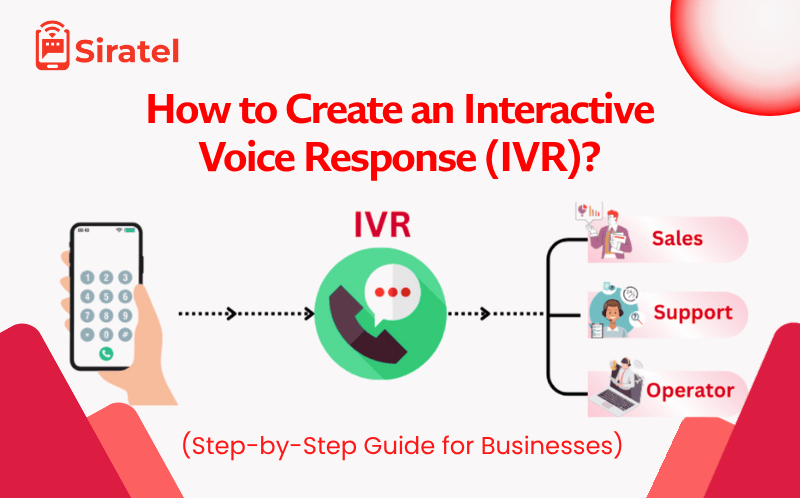
Interactive Voice Response (IVR) is an automated calling system that lets customers interact with your business using keypad inputs or voice commands. You’ve probably used IVR before — when you call a company and hear, “Press 1 for Sales, Press 2 for Support” — that’s an IVR system in action.
It works like a digital receptionist that answers every call instantly and routes it to the right team.
Example Table:
| Option | Action | Example |
|---|---|---|
| 1 | Account Info | “Press 1 for account balance” |
| 2 | Technical Support | “Press 2 to talk to support” |
| 3 | Sales | “Press 3 to connect with sales” |
Why Businesses Use IVR Systems
| Reason | How It Helps |
|---|---|
| 24/7 Availability | Customers can reach you even after office hours |
| Saves Time | Agents only get connected when needed |
| Improves Customer Experience | No waiting or transfers |
| Boosts Brand Image | Sounds professional and organized |
| Collects Data | Can gather inputs like customer ID or order number |
According to a HubSpot study, 80% of customers say fast response improves their trust in a brand. That’s why smart businesses use IVR systems powered by providers like Siratel.
Types of IVR Systems
| Type | Description | Best For |
|---|---|---|
| Single-level IVR | Simple menu like “Press 1 for sales, 2 for support.” | Small businesses |
| Multi-level IVR | Nested menus (language → department → service). | Medium to large companies |
| Cloud IVR | Runs entirely online; no hardware needed. | Fast-growing businesses |
How Does an IVR Work?
If you’re exploring how to create an interactive voice response, understanding how it works will make everything easier.
An IVR system connects the caller’s keypad or voice input to an automated flow that routes them to the correct department or plays pre-recorded information.
Call Flow Example:
Caller dials your business number.
IVR greeting plays: “Welcome to Siratel.”
Caller presses a number or says a command.
Call gets routed to the right team.
Caller details are logged for reporting.
How to Create an Interactive Voice Response (IVR) System Step-by-Step
Let’s go step by step and make it super simple.
Step 1: Choose the Right IVR Provider
Pick a trusted IVR service provider like Siratel, which gives you:
Cloud-based IVR setup (no hardware)
Custom caller IDs
Real-time analytics
Multi-level menu support
🧩 Pro Tip: Go for a platform with drag-and-drop IVR builders — saves time and avoids coding.
Step 2: Define Your IVR Goals
Before setting it up, decide what you want the IVR to do:
Route calls to departments
Collect feedback
Provide order or payment status
Lead capture via missed calls
Write down 2–3 clear goals. For example:
“We want to route calls automatically between Sales, Support, and Billing.”
Step 3: Create a Simple IVR Flow
Here’s a basic IVR flow example:
“Welcome message → Press 1 for Sales → Press 2 for Support → Press 3 for Billing”
You can build advanced flows later, like:
“Press 1 for Sales → Choose Region → Connect to Local Team”
| Level | Action | Example Voice Prompt |
|---|---|---|
| Level 1 | Main Menu | “Welcome to XYZ Company…” |
| Level 2 | Sub Menu | “Press 1 for South Region Sales…” |
| Level 3 | Agent | “Connecting you to our team…” |
Step 4: Record Clear Voice Prompts
Your IVR voice should sound friendly, slow, and easy to understand.
You can record your own or use text-to-speech tools provided by your IVR vendor.
Example Script:
“Hello! Welcome to Siratel.
To connect with our Sales Team, press 1.
For Customer Support, press 2.
To know about our services, press 3.”
Step 5: Set Up Call Routing
Call routing decides where each call goes after the caller makes a selection.
You can route by:
Department (Sales, Support, etc.)
Time (day or night routing)
Location (connect to the nearest branch)
This ensures your customers always reach the right person.
Step 6: Test Your IVR System
Before going live, test everything:
Are all options working?
Is the voice prompt clear?
Are calls routed correctly?
What happens if a caller presses a wrong key?
💡 Pro Tip: Have 3–4 people test the IVR and give feedback before launching.
Step 7: Go Live and Monitor Calls
Once your IVR is active, track:
Call volumes
Drop rates
Peak hours
Most selected menu options
Siratel provides real-time dashboards and call reports that help you improve your IVR over time.
Example of a Real IVR Setup
| Scenario | IVR Structure Example |
|---|---|
| Small Business | Welcome → Press 1 for Sales → Press 2 for Support |
| Hospital | Welcome → Press 1 for Appointments → Press 2 for Emergency |
| E-commerce | Welcome → Track Order → Return Request → Talk to Agent |
| Bank | Welcome → Account Info → Credit Card → Customer Care |
You may also like – How to Get a Verified Badge on Truecaller? Show Trust on Every Call
Common IVR Mistakes to Avoid
| Mistake | Problem | Fix |
|---|---|---|
| Too many menu options | Confuses customers | Keep it under 5 main choices |
| Long greeting messages | Frustrates callers | Stay under 10 seconds |
| No live agent option | Caller hang-ups | Always include “Press 0 for an agent.” |
| Poor sound quality | Miscommunication | Use a professional or AI voice |
Best Practices for a Great IVR Experience
The best IVR feels human, fast, and simple. Here’s how to make your interactive voice response stand out:
✅ Offer multiple language options
✅ Personalize greetings with caller ID
✅ Keep menus short and logical
✅ Always allow a live agent option
✅ Use analytics to track caller behavior
✅ Update call flow regularly
Top Platforms to Create IVR Systems
| Platform | Type | Best For |
|---|---|---|
| Siratel (Best) | Cloud IVR | Global businesses with custom routing |
| Twilio | API IVR | Developers |
| Exotel | Cloud IVR | SMEs |
| Knowlarity | Hosted IVR | Large enterprises |
Why Choose Siratel
Build IVR in minutes — no coding
Custom call flows
CRM integration
Real-time reports
99.99% uptime
24/7 technical support
Contact Siratel now for IVR Setup!
IVR Pricing in India
| Business Type | IVR Type | Estimated Monthly Cost |
|---|---|---|
| Small Business | Single-level IVR | Contact us now to get all the pricing at an affordable price. |
| Medium | Multi-level IVR | |
| Enterprise | Custom IVR setup |
IVR pricing depends on call volume, number of menus, and routing complexity. Cloud IVR is cheaper and easier to scale.
Benefits of Using Cloud IVR by Siratel
| Feature | Benefit |
|---|---|
| Multi-Level IVR | Handle complex call flows easily |
| Missed Call Integration | Capture leads even on missed calls |
| Real-Time Reports | Track performance instantly |
| 99.99% Uptime | No call drops |
| CRM Integration | Sync customer data automatically |
Siratel IVR can be set up in less than 10 minutes — no coding, no setup cost.
👉 Book a Free Demo with Siratel to see how easy it is to launch your own IVR.
When to Upgrade Your IVR
You should upgrade if:
Callers complain about confusing menus
Calls drop before connecting
You can’t track call data
You’re scaling beyond 100+ calls a day
Siratel’s Cloud IVR can handle 10,000+ concurrent calls, so you’ll never miss a lead.
Get Started with a Free IVR Demo
Setting up IVR doesn’t need coding or hardware.
With Siratel Cloud IVR, you can:
✅ Create menus in minutes
✅ Upload or generate custom greetings
✅ Route calls automatically
✅ Get detailed analytics
💡 See it in action!
FAQs Related to How to Create an Interactive Voice Response (IVR)
What is an Interactive Voice Response (IVR) system?
An IVR system is an automated phone menu that helps callers connect with the right department or get quick answers through keypad or voice inputs. It improves customer experience and saves time for your business.
How to create an Interactive Voice Response for my business?
To create an IVR, follow these simple steps:
- Choose a reliable IVR service provider like Siratel.
- Plan your call flow (welcome message, menu options, transfer rules).
- Record clear greetings and responses.
- Test the IVR before going live.
💡 Tip: If you’re not tech-savvy, book a free IVR setup demo with Siratel — they’ll guide you step-by-step.
What tools do I need to build an IVR system?
You need an IVR platform (like Siratel’s cloud IVR), a business number, and pre-recorded voice messages. You don’t need coding or expensive hardware — everything runs online.
Can I create an IVR without coding?
Yes! Most modern IVR platforms, including Siratel, let you create call flows with drag-and-drop tools — no coding needed. You can build and launch your IVR in minutes.
How much does it cost to create an IVR system?
The cost depends on the number of calls, menu levels, and customization. Siratel offers flexible pricing and free setup demos for businesses.
How long does it take to set up an IVR system?
With Siratel, you can set up an IVR in less than 30 minutes. You just pick your menu options, upload voice greetings, and your system is ready to go.
What are the benefits of using an IVR system?
✅ 24/7 automated customer support
✅ Call routing to the right department
✅ Professional brand image
✅ Increased call handling capacity
✅ Call tracking and analytics
If you want all this without any tech headache — Siratel can set it up for you free of cost in a demo.
Can I use IVR for multiple branches or departments?
Yes, you can route calls to different branches or teams through one IVR number.
For example, “Press 1 for Sales, Press 2 for Support.”
Siratel’s multi-level IVR makes this easy to manage.
Can I customize my IVR greetings in my own voice or language?
Absolutely! You can record greetings in any language or upload your own voice messages.
Siratel supports multilingual IVR setup — perfect for Indian businesses.
What mistakes should I avoid when creating an IVR?
Avoid these common IVR mistakes:
- Using long menus (more than 5 options)
- Confusing call flows
- Unclear or robotic greetings
- No option to speak to a human agent
Siratel’s IVR experts can help you design a smooth, customer-friendly call flow during your free demo.
Can I integrate IVR with my CRM or lead management system?
Yes, you can connect your IVR to your CRM to capture caller data automatically. Siratel supports integrations with popular CRMs so your leads never get lost.
How can I get a free demo of an IVR system?
You can book a free IVR demo with Siratel — their team will show you how to create, customize, and manage your IVR step-by-step.
✅ No setup fee
✅ No coding
✅ Live call flow demo
👉 Book your free demo today, and see how easily your business can sound like a big brand.
Final Thoughts
An IVR isn’t just for big brands anymore — it’s an affordable, powerful way to make your business sound professional, handle more calls, and give your customers the quick responses they expect.
Learning how to create an interactive voice response system can help you build better connections with customers — without hiring more staff or missing important calls.
Whether you’re a startup, school, hospital, or online store, an IVR can change how you manage communication.
👉 Ready to set up your IVR? Book your free demo with Siratel today!