

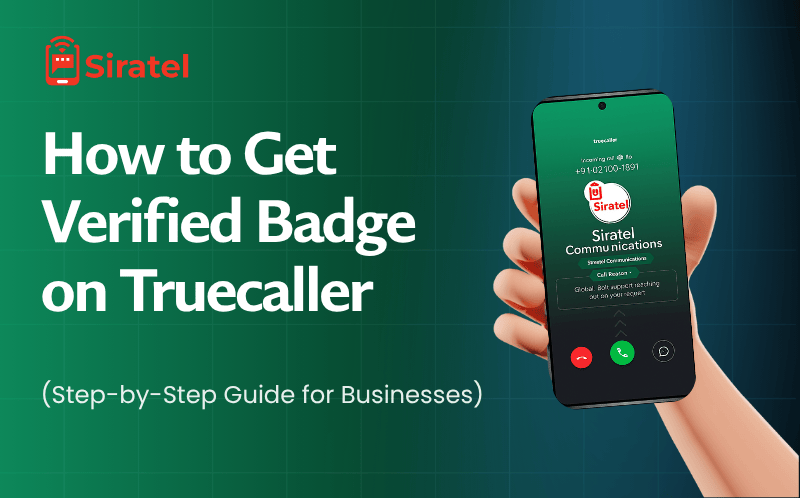
If you’ve ever called someone and noticed a blue tick next to the caller ID, that’s the Truecaller Verified Badge. It’s not just a small icon – it’s a mark of trust that tells people, “Hey, this call is from a real business.”
Let’s break down exactly how to get verified badge on Truecaller, why it matters for your brand, and how you can get it easily with a Truecaller partner like Siratel.
What Is the Verified Badge on Truecaller?
The verified badge on Truecaller is a blue tick that appears next to your business name.
It means Truecaller has confirmed that your number belongs to a real, registered company.
When your number is verified, customers instantly recognize your call as genuine — not spam or telemarketing.
Why It Matters
Builds trust before you even say hello.
Increases the chance that people pick up your calls.
Helps you stand out from random numbers and fake callers.
Example: Verified vs. Unverified Number
| Type of Number | Display on Truecaller | Customer Trust |
|---|---|---|
| Verified Business | Blue Tick + Brand Name | Very High |
| Unverified Business | Random Name / “Spam” Tag | Low |
| Personal Number | Custom User Name | Medium |
Why Businesses Need Truecaller Verification
Let’s be honest — most people don’t answer unknown numbers anymore. According to a 2024 report, 61% of mobile users ignore unidentified calls.
Here’s what Truecaller verification does for your business:
Builds instant trust with customers before the call connects.
Boosts answer rates by 30–40%.
Prevents “spam” or “fraud” labels on your number.
Improves brand recall because your company name and logo appear on every call.
Real Data: Businesses with Truecaller Verified Numbers report up to 40% higher pickup rates and 60% fewer spam complaints
Who Can Get Verified on Truecaller
Eligible Businesses
If you fall into one of these categories, you can apply for verification:
Registered companies with valid GST or business registration.
Service providers (e.g., banks, clinics, delivery partners).
Startups and enterprises that use official phone lines for customer communication.
Not Eligible
Individuals or freelancers using personal numbers.
Numbers are reported frequently for spam or telemarketing.
How to Get Verified Badge on Truecaller (Step-by-Step)
You can get verified on Truecaller by submitting your business details through Truecaller Business or an official partner like Siratel.
Here’s how the process works, step by step:
Step 1: Prepare Your Business Information
Before applying, keep these details ready:
Registered Business Name
Official Phone Number (mobile or landline)
Website URL
Business Email ID (matching your domain)
Business Address
GST Certificate or Company Registration Proof
Step 2: Contact a Truecaller Verified Business Partner (Like Siratel)
Truecaller doesn’t allow direct applications anymore – you must apply through an official partner.
Why choose a partner like Siratel?
They handle document verification.
Ensure your profile meets Truecaller’s guidelines.
Speed up approval by avoiding rejections.
Help you choose the right business plan.
📞 Want to get verified without confusion? Contact Siratel’s team – they’ll handle the process for you.
Step 3: Choose a Verified Business Plan
Different plans offer different benefits.
| Plan Type | Features | Ideal For |
|---|---|---|
| Basic | Blue Tick + Business Name | Small Businesses |
| Standard | Badge + Logo + Custom Call Reason | Medium Brands |
| Premium | All features + Analytics + API Access | Enterprises |
With Siratel, you also get setup support and call branding assistance.
Step 4: Verification Process
Here’s what happens after you submit your details:
Truecaller reviews your business information.
They check the authenticity of your documents.
Once approved, your business name and blue tick go live.
🕒 Time Required: 5–7 working days (on average).
Step 5: Go Live and Build Trust
After approval, every outgoing call from your number will display:
✅ Blue tick
🏢 Your official brand name
🖼️ Company logo (if added)
💬 Custom call reason (e.g., “Order Delivery”, “Appointment Reminder”)
Your customers will instantly recognize who’s calling — and that’s powerful.
Benefits of Getting Verified on Truecaller
| Benefit | Description |
|---|---|
| Builds Trust | Customers know the call is from a genuine company. |
| Higher Pickup Rate | People are more likely to answer verified calls. |
| Prevents Spam Label | Avoid being marked as fraud or telemarketer. |
| Boosts Brand Visibility | Every call promotes your business identity. |
| Improves Engagement | Customers respond better when they trust you. |
📊 Interesting Stats:
82% of users say they feel safer answering verified calls.
40% more calls are answered when the blue tick is visible.
Businesses see 3x improvement in call-based conversions.
Truecaller Verified Badge vs WhatsApp Green Tick vs Other Platforms
Many people confuse these. Here’s a quick comparison:
| Platform | Symbol | Where It Appears | Purpose |
|---|---|---|---|
| Truecaller | 🔵 Blue Tick | On incoming/outgoing calls | Caller Trust |
| WhatsApp Business | ✅ Green Tick | On the chat profile | Chat Verification |
| Google Verified Calls | 📞 Brand Logo | On the Android call screen | Verified Caller ID |
Pro Tip: Combine both Truecaller Blue Tick and WhatsApp Green Tick for full trust on calls and chats.
You may also like – What is WhatsApp Business API? Features, Benefits, and Use Cases
Common Mistakes That Delay Verification
Avoid these common errors:
Using personal numbers for business calls.
Email address doesn’t match business domain.
Submitting blurry or incomplete documents.
Changing numbers frequently.
Tip: If your number already shows “Spam,” ask your verification partner to help you clean the tag before applying.
Cost of Getting Verified Badge on Truecaller
The cost varies based on business size and plan.
| Business Type | Support Included | Estimated Cost (Yearly) |
|---|---|---|
| Small Business | Basic setup | Contact us now to get all the pricing at an affordable price. |
| Medium Enterprise | Logo + Branding | |
| Large Enterprise | Analytics + API Integration |
Want the exact pricing for your business?
👉 Fill out the enquiry form or call Siratel’s team to get your Truecaller badge setup quote.
How to Check If Your Number Is Verified
Open Truecaller and search your business number. If you see a blue tick and your brand name, your number is verified.
If not verified:
You’ll only see random text or “Spam.”
That means it’s time to apply for your badge.
How Long Does It Take to Get Verified?
Usually 5–7 business days, depending on your documents. Some enterprise verifications can take up to 14 days if additional checks are needed.
✅ Once verified, the badge is permanent, as long as your number isn’t flagged for spam or policy violations.
FAQs About Truecaller Verification
How can I get a verified badge on Truecaller for my business?
You can get a verified badge on Truecaller by applying through an official Truecaller partner like Siratel. Simply share your business name, number, website, and registration documents. Siratel handles the entire process and gets your blue tick approved within 5–7 days.
What are the requirements for Truecaller verification?
To get verified, you need a registered business name, official phone number, business email, website URL, and GST or registration proof. These documents confirm your identity and prevent misuse.
Can individuals get verified on Truecaller?
No. The Truecaller verified badge is only for registered businesses, not personal numbers. If you run a business, you can apply for verification through Siratel’s Truecaller Verification Program.
How long does it take to get verified on Truecaller?
Truecaller verification usually takes 5–7 working days after you submit all required details. If your documents need rechecking, it can take up to 14 days. Siratel ensures faster approvals with accurate submissions.
Is Truecaller verification free or paid?
Truecaller verification is a paid service. Pricing depends on your business plan and features (like logo, analytics, or API access). You can request a free consultation from Siratel to get your exact pricing.
Why should my business get verified on Truecaller?
A verified badge builds instant trust, increases call pickup rates by up to 40%, and removes “spam” tags. It also shows your brand name and logo on customer screens, improving your credibility and conversions.
What is the cost of Truecaller business verification in India?
The cost vary from small businesses and goes up to for enterprise features. Contact Siratel to get a quote tailored to your business type.
What happens after my number is verified on Truecaller?
Once verified, your number shows a blue tick, brand name, and custom call reason (like “Order Update” or “Support Call”). This makes your calls look official and trustworthy.
Can Siratel help remove spam tag from my number before verification?
Yes. If your number is marked as spam, Siratel can clean and re-verify it with Truecaller’s business team. This ensures your brand starts fresh with a verified, trusted profile.
Can I verify multiple business numbers on Truecaller?
Yes. You can verify multiple numbers under the same brand if they belong to your business. Siratel’s enterprise onboarding supports bulk verification for call centers, franchises, or multi-branch businesses.
What’s the difference between Truecaller verified badge and WhatsApp green tick?
Truecaller’s blue tick verifies your caller ID for phone calls, while WhatsApp’s green tick verifies your brand profile on chat. Siratel can help your business get both verifications for full customer trust.
How do I start my Truecaller verification process with Siratel?
It’s simple. Fill out the enquiry form or book a free demo on Siratel’s website. Their team will guide you, collect your business info, and get your number verified on Truecaller in just a few days.
Final Thoughts — Why Verification Matters for Your Brand
Here’s the thing: people today trust what they can see.
If your number shows as “Unknown” or “Spam,” customers won’t answer — even if you offer something great.
Getting a Truecaller Verified Badge makes every call look professional, safe, and reliable.
It’s like having a digital business card appear on your customer’s phone every time you call.
Ready to Get Verified?
Get your Truecaller Blue Tick with Siratel today.
Faster approval through official partnership
Dedicated onboarding support
100% verified profile setup
Fill out the enquiry form or talk to our verification expert — and start making trusted calls that customers actually answer.